How to Track ChatGPT and AI Assistant Traffic in Google Analytics 4
GA4 now groups visits from AI assistants into their own channel, and ChatGPT tags its links. Here is how to find that traffic, which pages it lands on, whether it converts, and what GA4 cannot show you.
Searvia · 10/27/2026 · 3 min read
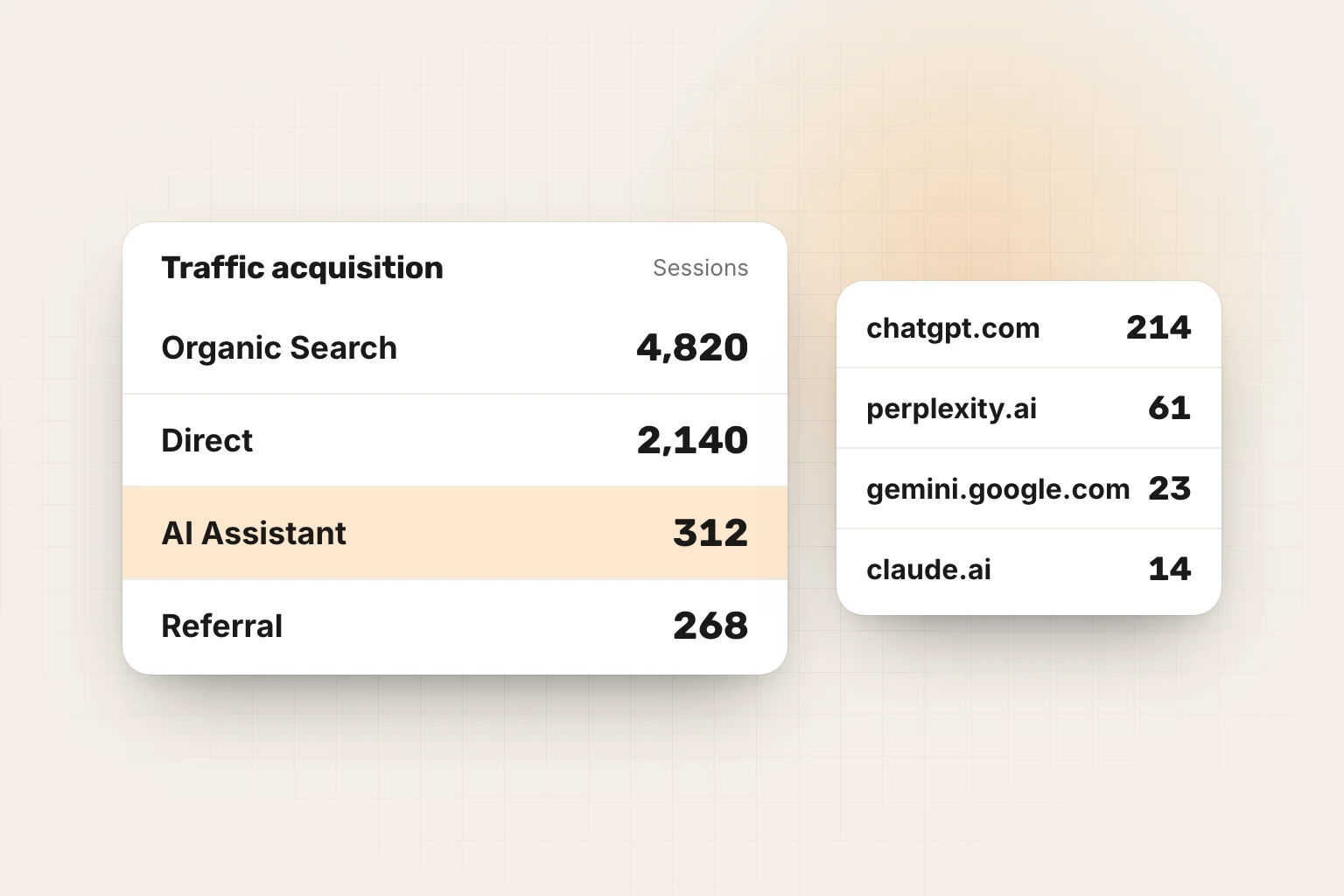
When ChatGPT or Perplexity recommends your site and links it, some of those readers click. Google Analytics 4 can show you how many, where they land and whether they buy or sign up. It cannot show you the answers where you were named but not clicked; that part needs a different measurement.
1. Check the AI Assistant channel
GA4's default channel group includes an AI Assistant channel for visits that come from sources like ChatGPT, with Gemini, DeepSeek, Copilot and Grok among Google's examples. Google's own AI Overviews and AI Mode are not part of it.
Open Reports › Acquisition › Traffic acquisition, keep the primary dimension on Session default channel group and look for the AI Assistant row. Change the dimension to Session source to see which assistants send the visits.
If the row is missing, your property may use a custom channel group, or the traffic is still too small to appear in the selected date range. Widen the range to 90 days before concluding there is none.
2. Build an exploration with a regex
The channel is a quick summary. For detail, create a free-form exploration:
- Explore › Blank.
- Dimensions: Session source, Landing page + query string, Session default channel group.
- Metrics: Sessions, Engaged sessions, Key events, Total revenue.
- Filter: Session source matches regex:
chatgpt|openai|perplexity|gemini|bard|copilot|claude|anthropic|deepseek|meta\.ai|you\.com|phind|mistral|grok
This is the same pattern Searvia uses when it reads GA4 for AI referrals. It catches both referrer domains (chatgpt.com, perplexity.ai) and the utm_source=chatgpt.com tag that ChatGPT adds to its links.
3. Look at the landing pages
Put Landing page in the rows. The pages AI assistants send people to are the pages they trust to answer something. Usually they are not your home page but comparison pages, pricing pages, guides and documentation.
Two things to check on each page:
- Does it still say what the answer said? If an assistant quoted a price or feature that changed, the visitor arrives confused. Update the page so the facts match.
- Is the next step obvious? These visitors have already read a summary of you. Give them the action they came for: a trial, a demo, a price table.
4. Compare conversion, not only volume
For most sites, AI referrals are still a small share of traffic next to organic search. Judge them by key events per session and revenue as well as by sessions. A visitor who arrives after an assistant recommended you often converts at a different rate from a search visitor, and that difference decides how much effort GEO deserves for your business.
5. Know what GA4 cannot show
- Visits without a referrer. Some app and desktop clients open links without passing a referrer; those sessions land in Direct.
- Answers without a click. Most people read the answer and move on. A brand mentioned in hundreds of answers may get a handful of visits.
- AI Overviews. Clicks from Google's AI features are counted as Organic Search, and in Search Console under the Web search type, mixed with normal results.
- What the answer said. GA4 does not record whether you were recommended first, compared unfavourably or described with outdated facts.
So treat GA4 as the floor of AI's effect on you, and measure the answers themselves. Ask a fixed set of buying questions in each assistant every week and track mention rate, citation rate and share of voice. Our AI visibility tracking guide explains the method.
Put both in one view
Searvia reads your GA4 property and shows AI assistant visits, landing pages and key events next to your keyword rankings and your weekly AI visibility in ChatGPT, Perplexity, Gemini and Claude. Connecting takes a minute: see Connect Google Analytics. To check one question now without an account, use the free AI visibility checker.
Frequently Asked Questions
- Does GA4 show traffic from ChatGPT?
- Yes. Visits that arrive with a referrer from AI assistants such as ChatGPT are grouped into the AI Assistant channel of GA4's default channel group, and ChatGPT adds utm_source=chatgpt.com to the links in its answers. You can see them in Reports › Acquisition › Traffic acquisition.
- Are Google AI Overviews counted as AI traffic?
- No. Clicks from Google AI Overviews and AI Mode come from Google Search, so GA4 counts them as Organic Search, and Search Console reports them under the Web search type. They are not part of the AI Assistant channel.
- Why is my AI traffic lower than expected?
- Some visits from AI apps arrive without a referrer and land in Direct, and many people read the answer without clicking at all. Treat GA4 numbers as a floor, and measure mentions and citations in the answers separately.
- Which AI sources should my filter include?
- At least chatgpt.com, chat.openai.com, perplexity.ai, gemini.google.com, copilot.microsoft.com, claude.ai, deepseek.com, grok.com and meta.ai. The regex in this article covers these and some smaller assistants.